Filter Questions in Surveys: 15 Examples (+ How to Use Them)
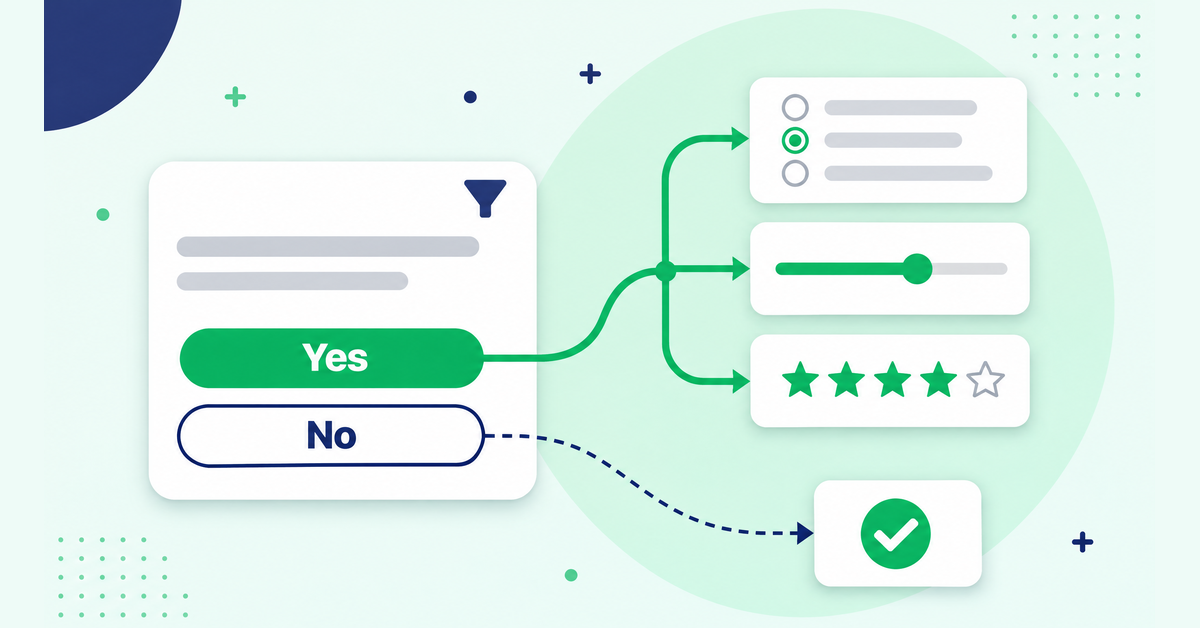
A filter question decides whether a respondent should see the questions that follow it. People who qualify keep going, and skip logic moves everyone else past that block or to the end of the survey, so you get fewer irrelevant answers and more people who finish. Here's how filter questions differ from screening and contingency questions, plus 15 examples with the skip rule each one needs.
What is a filter question?
A filter question checks whether a respondent has the experience needed to answer the questions that come next. If they do, they keep going. If they don't, skip logic sends them past those questions, either to a later section or to the end of the survey.
Here's the one most customer surveys need:
"Have you bought from us in the last 6 months?"
Yes: continue to the questions about the purchase.
No: skip to the general questions about the brand.
Leave that filter out and everyone gets asked how happy they were with their last order, including people who never placed one. Some will skip the question. Plenty will pick an answer anyway, often something in the middle, and those answers land in your averages next to the real ones. You can't separate them afterwards, because you never asked who actually bought.
Filter vs screening vs contingency questions
These three terms get mixed up all the time, partly because they usually appear together. Methods textbooks don't fully agree either, and some use "contingency question" for the filter itself. Here's how I use them:
| Type | Where it sits | What it does | Example |
|---|---|---|---|
| Filter question | Right before the block of questions it controls, anywhere in the survey | Decides who sees that block. Everyone else skips it and carries on with the rest of the survey. | "Have you contacted our support team in the last 3 months?" |
| Screening question | At the very start of the survey | Decides whether someone belongs in the survey at all. People who don't qualify are sent to the end. | "Do you or anyone in your household work in market research?" |
| Contingency question | Right after the filter | Only shown to people whose filter answer qualifies them, because it depends on that answer. | "How satisfied were you with the help you got from support?" |
Put simply, a screening question is a filter question that guards the whole survey instead of one section, and the contingency question is what the filter protects. Once a survey has more than one of these paths, you're building branches. What is branching logic covers how to plan them.
15 filter question examples (with skip rules)
Each example gives you the question, the answer options and the skip rule it needs. "The block" means the questions that only make sense for people who qualify. Change the time frames and names to fit your survey.
Customer feedback
1. Have you used our mobile app in the last 30 days?
Answers: Yes / No
Skip rule: If No, skip the app questions and go to the first question after that block.
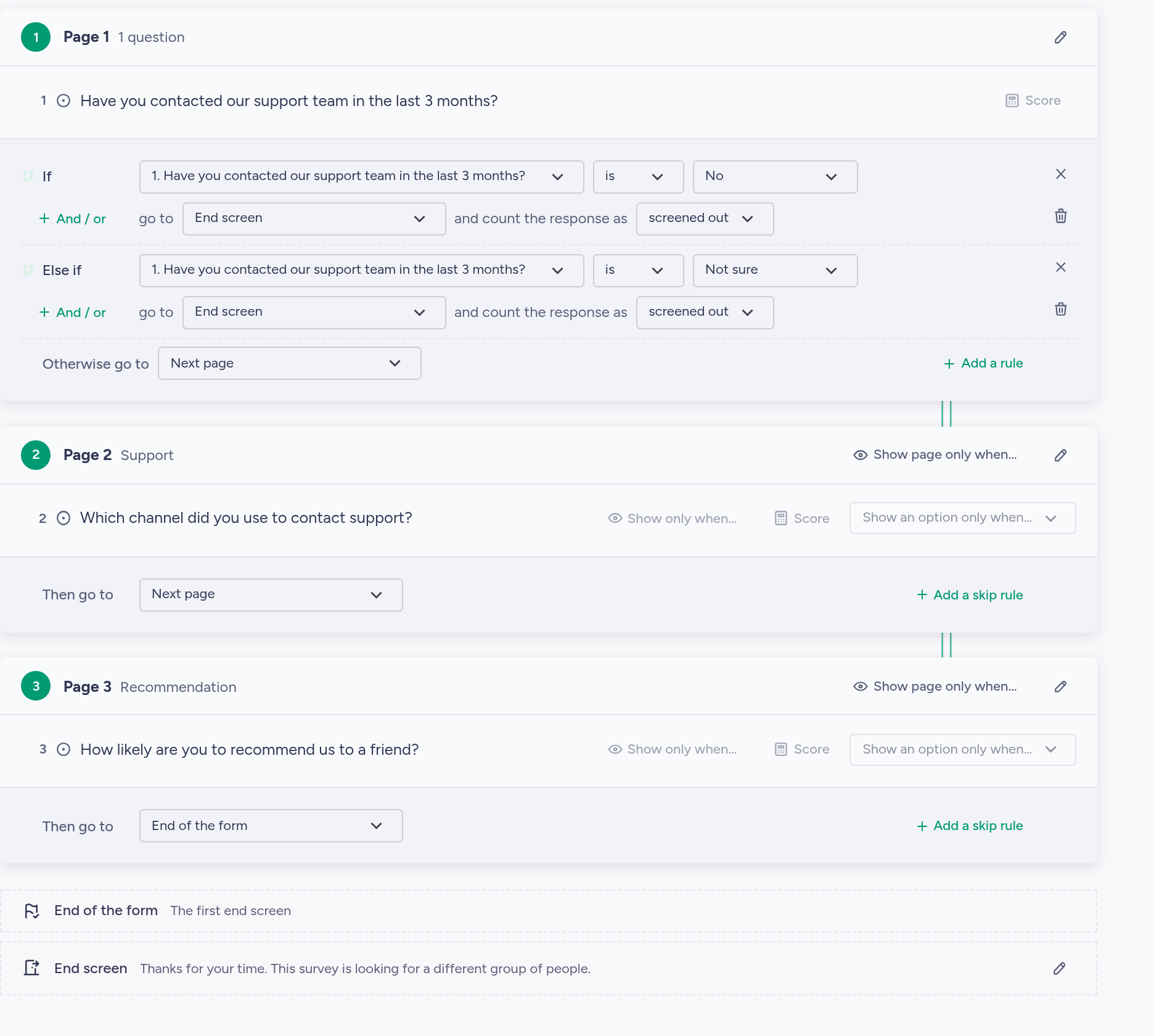
2. Have you contacted our support team in the last 3 months?
Answers: Yes / No / Not sure
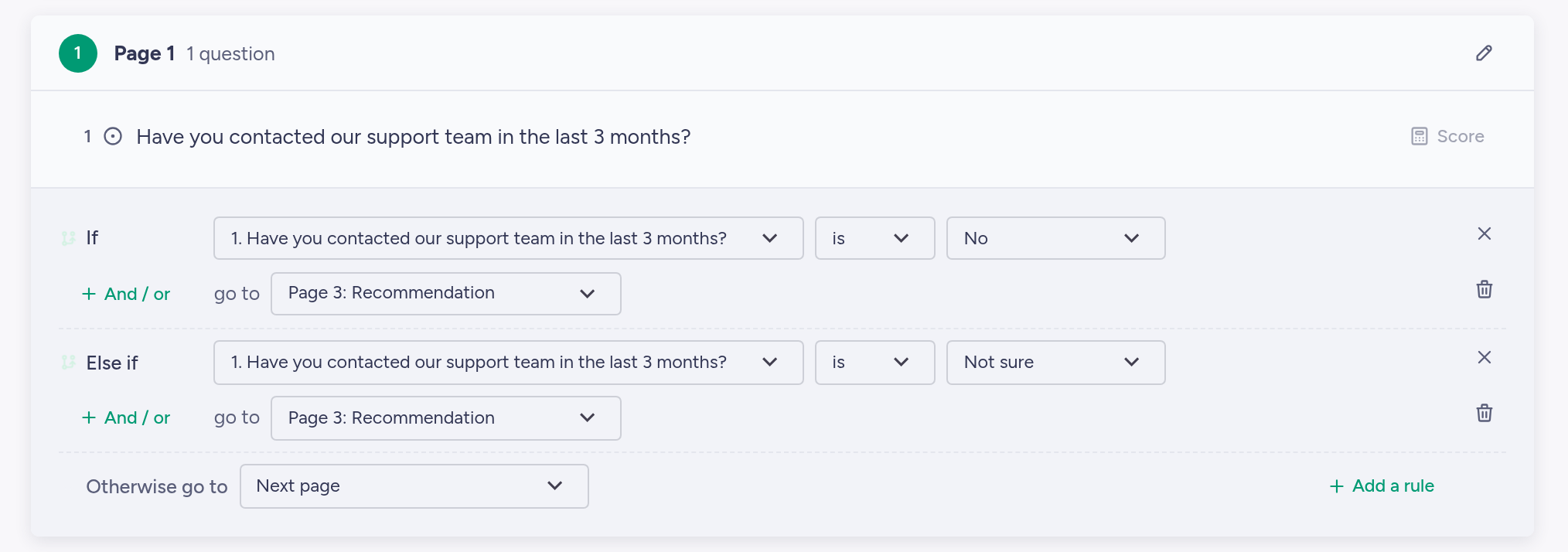
Skip rule: If No or Not sure, skip the support satisfaction questions.
3. Did you buy anything during this visit?
Answers: Yes / No
Skip rule: If Yes, skip "What stopped you from buying today?". If No, skip the checkout questions and go straight to it.
4. Did you renew your subscription this year?
Answers: Yes / No, I cancelled / Not due yet
Skip rule: If Yes or Not due yet, skip the question about why they cancelled.
Employee surveys
5. Do you manage at least one person directly?
Answers: Yes / No
Skip rule: If No, skip the questions for managers.
6. Have you worked from home at least one day a week in the last 3 months?
Answers: Yes / No
Skip rule: If No, skip the remote work block.
7. Did you join the company in the last 6 months?
Answers: Yes / No
Skip rule: If No, skip the onboarding questions. If you need ideas for that block, here are 20+ onboarding survey questions for new hires.
8. Have you attended any company training this year?
Answers: Yes / No / Not sure
Skip rule: If No or Not sure, skip the training evaluation questions.
One caution for employee surveys: in a small team, "Do you manage people?" plus a department question can be enough to identify someone. If the survey promises anonymity, check what the filters reveal when you combine them.
Market research screeners
Screeners usually sit at the start and end the survey for anyone outside your target group. If you're recruiting respondents for a study, our guide on how to do market research with surveys covers the steps before this one.
9. Do you or anyone in your household work in any of these industries?
Answers: Market research / Advertising or marketing / Journalism or media / [Your industry] / None of these
Skip rule: If any answer other than None of these, end the survey.
10. How often do you buy [product category]?
Answers: Every week / Every month / A few times a year / Never
Skip rule: If Never, end the survey. Screen out "A few times a year" too if you only want regular buyers.
11. Who in your household makes most of the decisions about grocery shopping?
Answers: Me / Shared equally / Someone else
Skip rule: If Someone else, end the survey.
12. What's your role in choosing software for your team?
Answers: I make the final decision / I influence the decision / I'm not involved
Skip rule: If I'm not involved, end the survey.
Events
13. Did you attend [event name]?
Answers: Yes, in person / Yes, online / No
Skip rule: If No, skip to "What kept you from attending?" and then to the end. If Yes, online, skip the venue and catering questions.
14. Did you attend any of the workshops?
Answers: Yes / No
Skip rule: If No, skip the workshop ratings.
15. Would you like us to tell you about next year's event?
Answers: Yes / No
Skip rule: If No, skip the email address question and go to the end screen.
A typical pattern I see with example 2: a customer survey asks everyone to rate support, and the support score comes back flat. A good share of those ratings come from people who never contacted support and picked the middle option. Add the filter and the score starts to mean something, but it now rests on a much smaller group, so you may need to send the survey to more customers to get enough support answers. Cleaner answers from fewer people is the trade you're making.
Want to try one of these? Build it free on QPoint Survey. Skip logic and display logic are on the Free plan, no credit card needed.
5 mistakes with filter questions
- Leading wording. "You use our app every week, right?" pushes people toward Yes, and every extra Yes lets someone into a block they shouldn't be answering. Ask it neutrally, with a clear time frame: "Have you used our app in the last 30 days?"
- Asking about two things at once. If someone answers Yes to "Have you visited our store or bought from our website?", you don't know which one they did, so the follow-up questions can't know either. Split it into two filters, or give each option its own answer.
- No "Not sure" option where memory is fuzzy. People don't always remember whether they called support in March. Forced to pick Yes or No, some of them guess. A "Not sure" option that's routed the same way as No keeps those guesses out of the block.
- Filtering too early or too late. Too late, and people have already answered questions that didn't apply to them. Too early, and the filter ends up far from the block it controls, which is confusing to edit later. Put each filter right before its block. In screeners, also mix the qualifying answer in with several others, because some respondents will work out which answer gets them in.
- Screening people out without a polite end screen. Someone you disqualify after two questions still gave you their time. Thank them and say plainly that you were looking for a different group this time. A "Thanks for completing our survey!" message when they barely started reads like a mistake.
How to set up a filter question in QPoint
In QPoint, a filter question is an ordinary question with a skip logic rule on it. Skip logic, branching and display logic all work on the Free plan.
- Add the filter question (Yes/No or multiple choice works best) and put the questions it controls directly after it.
- Open the skip logic settings on the filter question in the question editor and add a rule.
- Set the condition: if the answer is No, skip to the first question after the block. For a screener, send non-qualifying answers to the end of the form instead.
- Add a rule for each other answer that needs routing, such as Not sure.
- Preview the form and go through every path once: as someone who qualifies and as someone who doesn't.
On Free, a form has one end screen. People you screen out and people who finish will see the same message, so write it to work for both. If you want a separate "Thanks, but you're not in the group we're surveying" screen, you'll need multiple end screens, which come with Professional at €20 a month. You can still build and preview the extra end screens on Free. The upgrade only applies when the form goes live.
Also keep an eye on the question count. Free allows 10 questions per form, and a screener with three filters uses up a good part of that. If you're still choosing a tool, here's which survey tools have skip logic on which plan.
FAQ
What is an example of a filter question?
"Have you bought from us in the last 6 months?" is a typical one. People who answer Yes go on to questions about their purchase, and people who answer No skip them. "Do you manage other people?" in an employee survey and "Did you attend the event?" in event feedback work the same way.
What's the difference between a filter question and a screening question?
A filter question controls one section: people who don't qualify skip that section and carry on with the rest of the survey. A screening question controls the whole survey. It sits at the start, and people who don't qualify are sent to the end.
Where should filter questions go in a survey?
Directly before the block of questions they control. Screening questions are the exception: they go at the very start, so nobody who's about to be screened out answers anything else first.
Are filter questions the same as skip logic?
They work together. The filter question is what you ask, and skip logic is the rule that moves people based on the answer. Display logic is the other option: it shows a single follow-up question only to people whose answer qualifies, without jumping past a whole block. Our guide to skip logic vs. display logic vs. branching explains when to use which.
Pick the examples that match your survey, adjust the time frames and build it in a free QPoint Survey account. Every skip rule above works on the Free plan, and you can test each path in preview before anyone sees the form.