The 5 logic types to check before you pick a tool
Nearly every survey tool's feature page says "conditional logic". The label covers anything from a single section jump to a full rules engine, and vendors often split the pieces across plans. These are the five I check, roughly in the order people run into them:
- Skip logic jumps a respondent past questions that don't apply to them, based on an earlier answer.
- Branching sends different respondents down different paths, so a customer and a non-customer see different follow-up questions.
- Display logic (show/hide) shows or hides a single question based on earlier answers, without moving anyone to another page.
- Answer piping puts an earlier answer into a later question, as in "What do you like most about [brand they picked]?"
- Scoring and variables add up points or values behind the scenes for quizzes, outcomes and segments. Hidden fields belong here too: they pass data such as a customer ID or traffic source into the form through the URL, without asking for it.
If the line between the first three feels blurry, our guide to skip logic vs. display logic vs. branching explains each one with examples, and what is branching logic goes deeper on survey paths.
Survey tools with skip logic: comparison table by plan
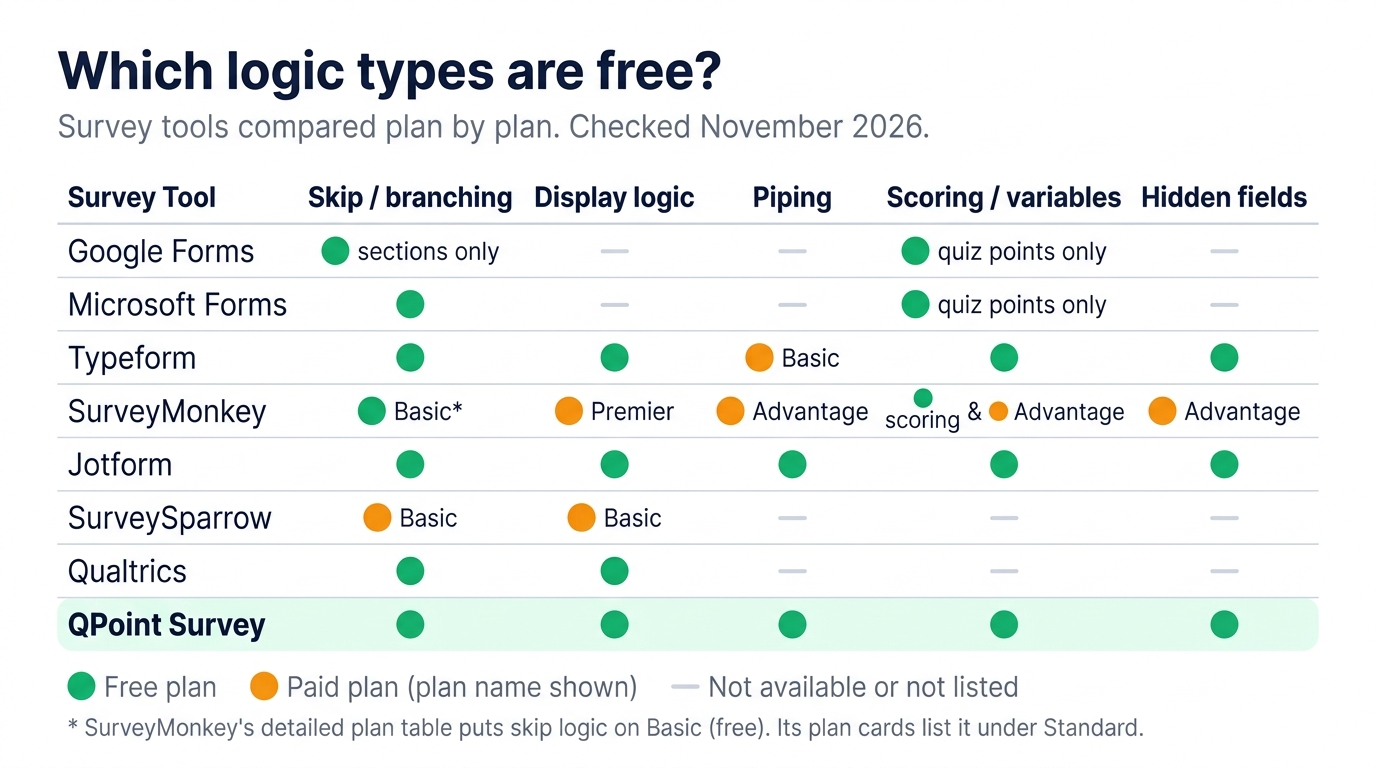
Each cell names the cheapest plan that includes the feature. Prices and limits come from each vendor's own pricing and help pages, checked November 2026. We checked from Europe, so some vendors showed prices in euros and others in dollars; your price may differ by region. "Not listed" means we couldn't find the feature on that vendor's plan or help pages. It doesn't prove the feature is missing.
| Tool | Skip / branching | Display logic | Piping | Scoring / variables | Hidden fields | Cheapest plan with all of these | Responses on that plan |
|---|---|---|---|---|---|---|---|
| Google Forms | Free (section jumps only) | No | No | Quiz points only | No | None. Free covers section branching | Unlimited |
| Microsoft Forms | Free | No | Not listed | Quiz points only | Not listed | None. Free covers branching | 200 per form (free personal account) |
| Typeform | Free | Free | Basic | Free | Free | Basic, $39/mo ($28/mo yearly) | 100/mo |
| SurveyMonkey | Basic* | Premier | Advantage | Scoring: Basic. Variables: Advantage | Advantage (custom variables) | Premier, €99/mo billed yearly | 40,000/year |
| Jotform | Starter (free) | Starter (free) | Starter (free) | Starter (free) | Starter (free) | Starter, free | 100/mo, 5 forms |
| SurveySparrow | Basic | Basic | Not listed | Not listed | Not listed | Basic, $19/mo billed yearly (skip + display) | 2,500 |
| Qualtrics | Free | Free | Not listed | Not listed | Not listed | Free (skip, display, branch) | 500 |
| QPoint Survey | Free | Free | Free | Free | Free (URL variables) | Free | 100/mo, 10 questions per form |
* SurveyMonkey's detailed plan comparison marks question and page skip logic as available on Basic, while its plan cards list skip logic under Standard. More on that below.
Google Forms
Google Forms supports branching on its free plan, but only between sections. You set "Go to section based on answer" on a question, and the respondent jumps to the section you chose (or straight to submit). Google's help page confirms the option only works on multiple choice and dropdown questions.
There's no way to show or hide a single question, so every conditional question needs a section of its own, and a survey with a handful of rules quickly turns into a long list of sections. There's no answer piping. Scoring exists only in quiz mode, as points per question. Responses are unlimited and free, which is a big part of why people stay.
For a feedback form with one fork in it, that's enough. When a question should appear only for people who answered two earlier questions a certain way, the section workaround gets hard to maintain. If you're at that point, our Google Forms alternative page compares what changes when you switch.
Microsoft Forms
Microsoft Forms supports branching on every plan, including a free personal Microsoft account. Branching sends respondents to a different question or section depending on their answer, and Microsoft's service description lists it for business, enterprise, education and government plans alike.
That's roughly where the logic ends. There's no separate display logic, and we couldn't find answer piping or hidden fields in Microsoft's documentation. Quizzes support points and auto-grading, which handles simple scoring but not computed outcomes.
The limit to watch is volume. On a free personal account (Outlook.com, Hotmail or Live), a form can receive up to 200 responses, or 1,000 on a paid personal account. Work and school accounts get much higher limits. If your organisation already runs Microsoft 365, Forms is the easiest route for internal surveys with simple branching. Client-facing research with layered conditions is a different job.
Typeform
Yes, Typeform supports logic jumps on its Free plan and on every paid plan. Typeform's Help Center article on the Free plan lists logic (including question display), scores, variables and URL parameters, which work as hidden fields. Several comparison posts say Typeform's free plan has no logic. That's wrong for the plans Typeform's help pages describe, although Typeform notes that it experiments with pricing, so some accounts may see different plans.
The catch is volume. Free allows 10 responses a month across all your forms. Basic costs $39 a month ($28 billed yearly) for 100 responses a month, and that's the plan where recall, Typeform's name for answer piping, is included. Plus is $79 a month for 1,000 responses, and 10,000 responses need Business at $129 a month.
The logic builder is good, and the one-question-per-screen format looks better than most. If your survey gets a few dozen responses a month and design matters, Typeform is a strong pick. At research volumes, the cost per response climbs quickly. Our Typeform alternative page has the full side-by-side.
SurveyMonkey
SurveyMonkey has conditional logic, but it's spread over four individual plans, and show/hide logic sits on the most expensive one. This is what the detailed plan comparison showed in November 2026:
- Basic (free): question and page skip logic, quiz scoring, 10 questions per survey, and a limited number of viewable responses per survey. SurveyMonkey only shows the exact number after you sign up.
- Standard Monthly (€39/month): skip logic, unlimited questions and 1,000 responses a month. No piping.
- Advantage Annual (€36/month, billed €432 a year): adds question and answer piping, carry-forward responses, custom variables and quotas, with 15,000 responses a year.
- Premier Annual (€99/month, billed €1,188 a year): adds advanced branching, which is where you can show or hide questions and pages based on several conditions, plus advanced piping. 40,000 responses a year.
One inconsistency: the plan cards list skip logic as a Standard feature, while the detailed table marks it available on Basic. Test it in a free account before you plan a project around it. So, does SurveyMonkey offer logic branching? Simple skip rules, yes, on free or cheap plans. Multi-condition branching and display logic, only on Premier.
Jotform
Jotform supports conditional logic on every plan, including the free Starter plan. Jotform says Starter includes all standard features, and its conditions cover showing or hiding fields, skipping to a page and calculating values. Fields can be hidden and prefilled from a URL, and earlier answers can be inserted into later labels, which is Jotform's version of piping.
The limits are on volume and form count. Starter allows 5 forms and 100 submissions a month, with Jotform branding. Bronze costs €39 a month (about €34 a month billed yearly) for 25 forms and 1,000 submissions.
Jotform is a form builder first. It's strong for registrations, applications, payments and anything that feeds a workflow, and the condition editor can do a lot once you learn where things live. For surveys, keep the 5-form cap in mind: if you run a separate survey per client or per wave, you may hit it before you hit the submission limit.
SurveySparrow
SurveySparrow includes display and skip logic from its Basic plan up; its Free plan card doesn't list logic. The Free plan is tight anyway: 3 active surveys, 10 questions per survey and 75 responses per quarter. (The FAQ on the same pricing page says 50 responses a month, so check what your account shows.)
Basic is $19 a month billed yearly and lists 2,500 responses, email distribution, partial responses and display and skip logic. Starter ($49) adds survey translation and completion redirects. Business ($99) adds custom branding and workflows. We couldn't find piping, scoring or hidden fields on the plan cards, so the table says "not listed" instead of guessing.
SurveySparrow is known for its chat-style conversational surveys and its CX tools for NPS and CSAT. For a few small surveys with skip rules, Basic is a fair entry price. If you need layered branching or variables, use the 14-day trial (it unlocks Business features, capped at 50 responses) to check the specific logic you need.
Qualtrics
Qualtrics includes skip, display and branch logic on its free account. That may surprise you, because Qualtrics is known as the expensive enterprise option, and it is that too.
The free account comes with 500 responses, 3 active surveys, 30 questions per survey and 8 question types. The next step on the public price list is Strategic Research at $420 a month ($5,040 a year), which adds 23 question types, quota management, response weighting and advanced statistics. Before signing up for anything, academics should check whether their university already has a full Qualtrics licence; Qualtrics itself suggests this on the free account page.
For a single academic or pilot study, the free account covers the three core logic types. For ongoing commercial work, the jump from free to $5,040 a year leaves nothing in between.
QPoint Survey
QPoint Survey includes skip logic, branching, display logic, answer piping, compute variables and URL variables (hidden fields) on its Free plan. QPoint is our product, so here's the fair version, including where it loses.
Free gives you 100 responses a month and 10 questions per form, with no credit card. Professional is €20 a month for 3,000 responses, unlimited questions and export to Excel and PDF. Corporate is €70 a month for 10,000 responses and up to 5 team members. Set that against the tools above: SurveyMonkey's display logic needs Premier, and Typeform's 1,000-response plan costs $79 a month. QPoint can also send a survey to your own contact list with automatic reminders, on every plan.
Where it loses: integrations go through Zapier only, with no native Google Sheets or CRM connectors. Each form has one language, so there are no multi-language forms, and you can't take payments in a form. If any of those is a requirement, Jotform or Typeform will suit you better.
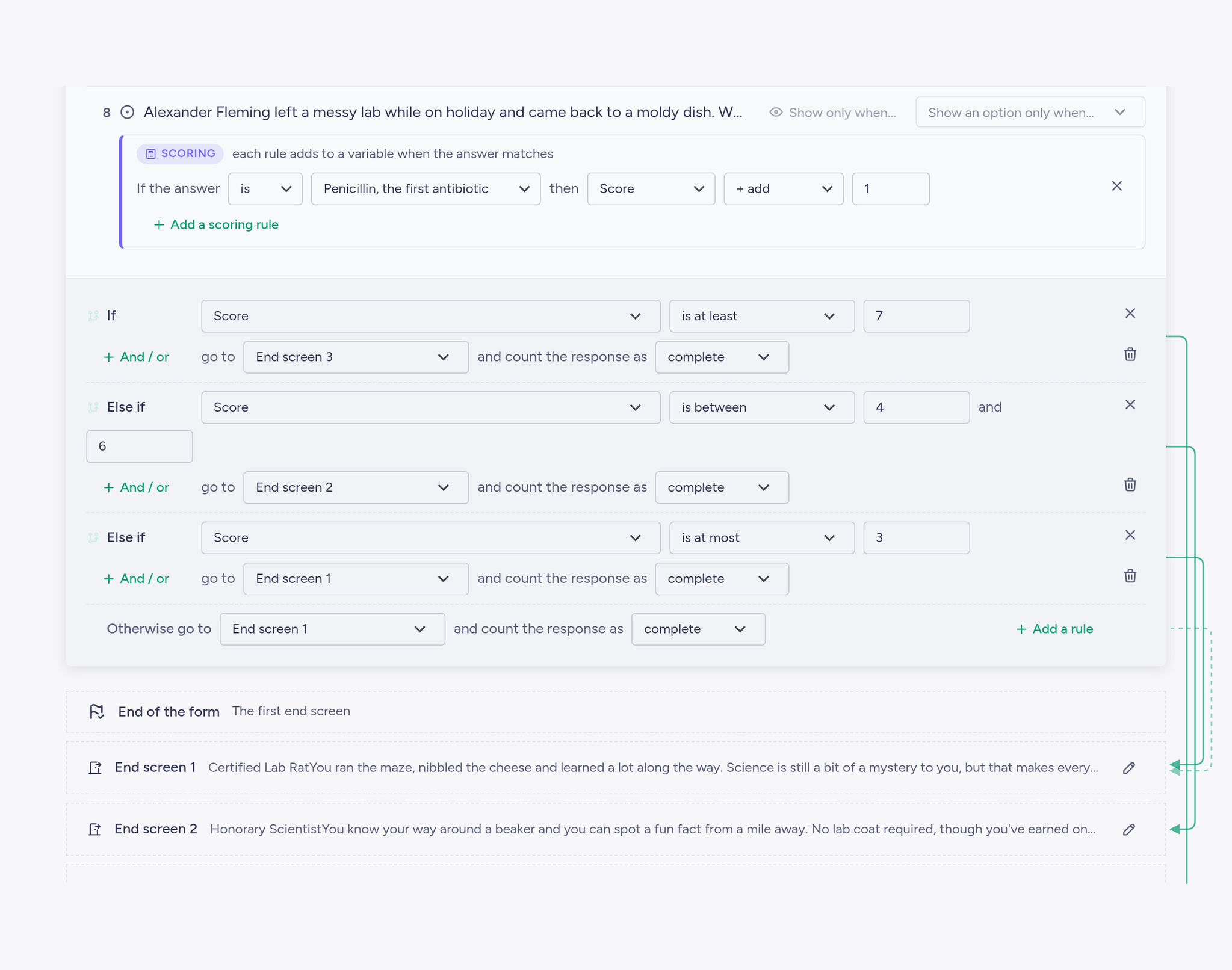
Want to test multi-condition logic without paying first? Build it free on QPoint Survey. Skip logic, display logic, piping and compute variables are all on the Free plan, no credit card.
Which one should you use?
Picking survey software with branching logic mostly comes down to how complex your paths are and how many responses you expect each month.
- Simple branching for free: Google Forms if you already work in Google and one or two forks are enough, Microsoft Forms if you're on Microsoft 365, and Jotform if you want every logic type for free and five forms is enough.
- Complex branching on a budget: QPoint Survey. Every logic type is on Free, and Professional covers 3,000 responses a month for €20 when a project grows.
- Enterprise or academic research: Qualtrics, especially if your institution already has a licence.
- Best design: Typeform, as long as your volume stays low or the budget stretches to Plus or Business.
A typical pattern we see with client intake surveys: new and returning clients need different questions, and a budget question should only appear for larger projects. That's one branch and one display rule, which most tools on this list can handle. The trouble tends to arrive a week later, when the client asks for the follow-up question to repeat the company name the respondent typed earlier. That's piping, and it's the point where section-only tools like Google Forms stop being enough.
FAQ
Which free survey tool has skip logic?
Most of the tools here have some form of it on a free plan: Google Forms (section jumps only), Microsoft Forms, Typeform (10 responses a month), Jotform (100 submissions a month), Qualtrics (500 responses), SurveyMonkey Basic (according to its detailed plan table) and QPoint Survey (100 responses a month, with display logic, piping and compute variables included).
Does SurveyMonkey have conditional logic on the free plan?
Partly. SurveyMonkey's detailed plan comparison marks question and page skip logic as available on Basic. Piping and custom variables start at Advantage, and advanced branching, which includes showing and hiding questions, needs Premier (€99 a month billed yearly, as shown to us in November 2026).
Does Typeform have logic jumps?
Yes. Typeform's Help Center lists logic, question display, scores, variables and hidden fields on the Free plan, which allows 10 responses a month. Recall (answer piping) is included from Basic, which costs $39 a month or $28 a month billed yearly.
What's the difference between skip logic and branching?
Skip logic moves a respondent past questions that don't apply to them. Branching splits respondents into separate paths, each with its own set of questions. Many tools use the two terms interchangeably. Our skip logic vs. display logic vs. branching guide walks through both, plus display logic, with examples.
The quickest way to know whether a tool fits is to build your own survey in it. Create a free QPoint Survey account, add your skip rules, a display condition and a piped answer, and preview it before you pay anything. If you outgrow 100 responses a month, Professional is €20.